


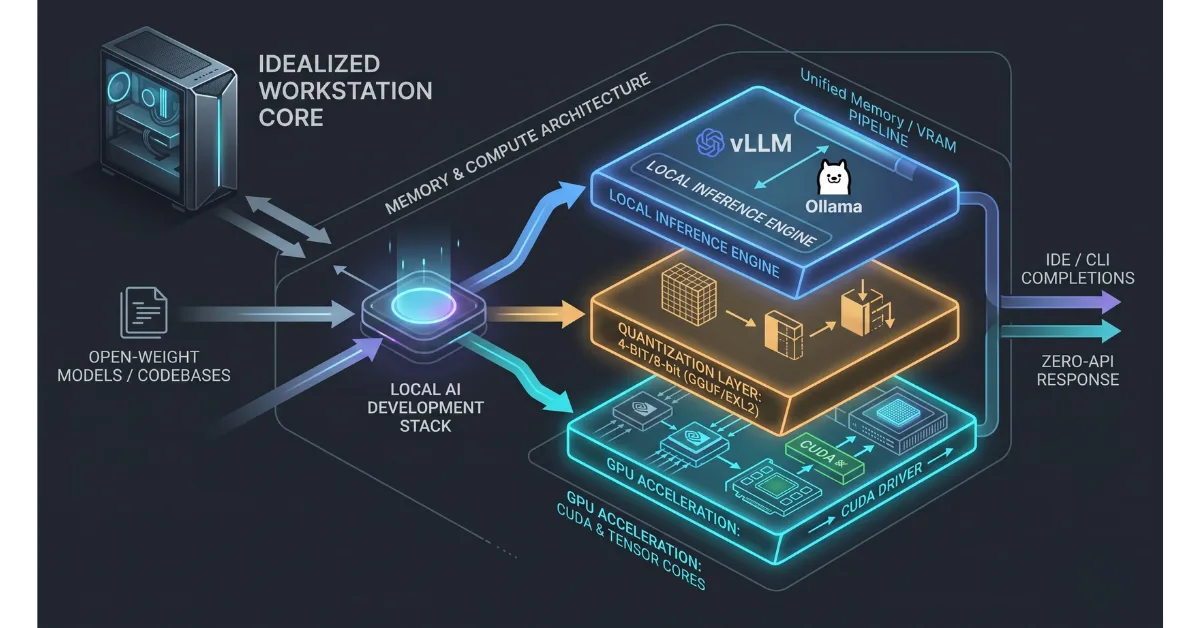
Modern engineering teams face an expensive dilemma when adopting artificial intelligence for internal development workflows. Routing every proprietary code review, unit test generation, and pull request summary through commercial cloud APIs introduces severe data security risks, monthly token invoice shocks, and latency bottlenecks. Building a dedicated local AI development stack eliminates these liabilities by running open weights directly on local hardware.
A high-performance local AI development stack provides three operational advantages. While scaling complex cloud platforms often triggers fragile pipelines and operational breakdowns in business AI workflow automation, running local open weights delivers total reliability. First, internal codebases never leave the local area network, maintaining non-negotiable engineering team code privacy standards. Second, developers experience sub-30ms token latency without cloud network hops. Third, engineering organizations eliminate unpredictable per-token operational expenditures in favor of fixed hardware assets.
[ Developer IDE / CLI ] ──> [ Local LLM Inference Runtime ] ──> [ Unified Memory / VRAM ] ──> [ Zero-Network Response ]
The Economic and Privacy Case for Local AI Infrastructure
Engineering leaders frequently underestimate the cumulative cost of developer seats on third-party generative platforms. A mid-sized software team of fifty engineers running continuous code completion, terminal debugging, and test scaffolding consumes millions of input tokens every business day.
Third-party API providers often reserve rights to inspect payload exceptions or log prompt telemetry. For companies building proprietary algorithms, trade-secret architectures, or regulated healthcare and fintech software, sending raw code over external HTTP endpoints represents an unacceptable compliance violation. Maintaining absolute engineering team code privacy is often the single deciding factor that drives companies away from cloud-hosted subscriptions.
Transitioning to a private local AI development stack replaces recurring software-as-a-service line items with owned compute infrastructure. Setting up a dedicated local LLM inference runtime on local workstations or private on-premise inference servers ensures that proprietary intellectual property remains strictly within the corporate perimeter.
Core Business Advantages of On-Premise AI
- Guaranteed Data Security: Protecting engineering team code privacy ensures that source code, environment variables, internal database schemas, and proprietary business logic never cross public internet pathways.
- Deterministic Inference Latency: Local execution bypasses public API rate limits, regional outages, and peak-hour cloud congestion.
- Zero Token Billing Anxiety: Developers can run complex agent loops, deep repository indexing, and automated multi-file refactoring without monitoring credit burn rates.
- Offline Development Capability: Engineers maintain full access to context-aware code completions and architectural reasoning tools without an active internet connection.
Architectural Breakdown of Modern Local Inference Backends
Selecting the correct backend engine forms the foundation of any scalable local AI development stack. In 2026, the local ecosystem has consolidated around specialized inference backends designed for specific developer workflows.
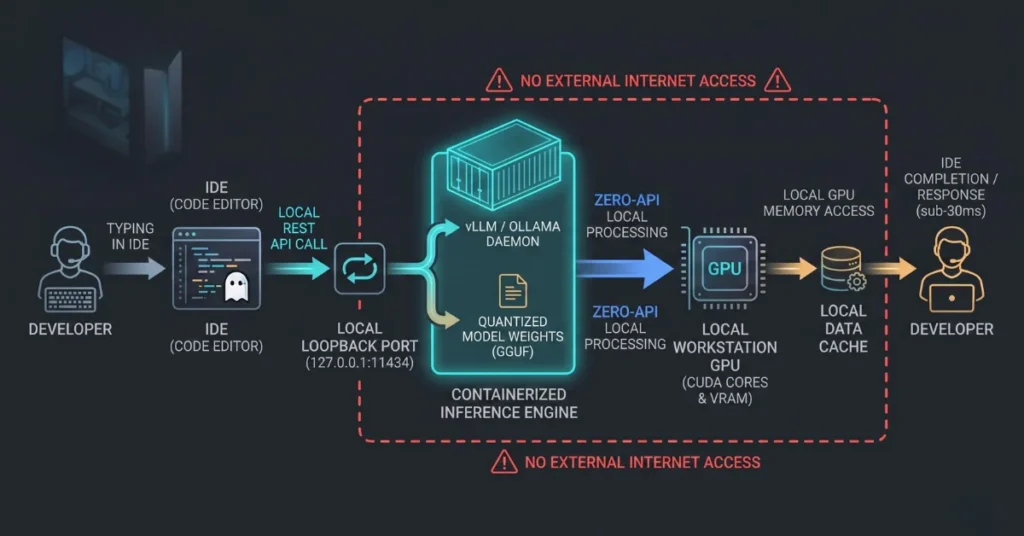
Choosing between options like Ollama vs vLLM for developers comes down to whether you are provisioning individual laptops or deploying a centralized on-premise compute cluster.
| Inference Runtime | Primary Use Case | Supported Hardware | API Standard | Memory Management Engine |
| Ollama | Single-developer workstations and rapid CLI prototyping | Apple Silicon, NVIDIA CUDA, AMD ROCm | OpenAI Compatible (/v1/chat/completions) | Dynamic model swapping with automated quantization loading |
| vLLM | High-concurrency shared team servers and internal API clusters | High-end NVIDIA enterprise GPUs (Blackwell, Hopper, Ada) | Native OpenAI API with multi-tenant queuing | PagedAttention memory allocation with continuous batching |
| llama.cpp | Embedded systems, legacy CPUs, and cross-platform edge binaries | Universal (CPU, Metal, OpenCL, Vulkan, SYCL) | Lightweight HTTP server via manual binary compilation | Direct raw GGUF memory mapping with manual thread allocation |
| MLX Engine | Native Apple Silicon performance optimization | Apple Silicon Unified Memory (M-Series chips) | Python native with local REST wrappers | Zero-copy unified memory architecture with native Metal acceleration |
When evaluating Ollama vs vLLM for developers, single engineers typically prefer Ollama because it handles model weights and memory unloading automatically. Engineering teams building shared internal gateways prefer vLLM because its continuous batching handles dozens of concurrent IDE requests without dropping connection speeds.
Hardware Sizing and Quantized Model Deployment
Running an enterprise local AI development stack requires matching model parameter weights to physical hardware memory capacity. The biggest bottleneck in local inference is not raw compute core count. It is memory bandwidth and available video random access memory (VRAM). This is why a proper quantized model deployment strategy is essential for every team setup.
Model Size and Memory Allocation Matrix
- 8 Billion Parameter Models (e.g., Llama 3 8B, Qwen 2.5 7B): Requires a minimum of 8 GB to 12 GB unified memory or dedicated VRAM. Suitable for standard software laptops running inline code completion.
- 14 Billion to 32 Billion Parameter Models (e.g., Qwen 2.5 14B, Gemma 2 27B): Requires 16 GB to 32 GB of dedicated memory. Delivers the ideal balance of reasoning depth and fast token generation speeds for complex refactoring.
- 70 Billion Parameter Models (e.g., Llama 3 70B, DeepSeek V2.5): Requires 48 GB to 64 GB of unified memory or dual high-end graphics cards. Provides enterprise-grade system design analysis and deep multi-step logic parsing.
Executing an efficient quantized model deployment compresses 16-bit floating-point weights into 4-bit or 8-bit integer formats like GGUF. This process slashes VRAM requirements by over 60 percent with virtually zero detectable loss in code syntax accuracy.
Memory Requirement Formula:
Total VRAM Needed = (Model Parameters in Billions * Precision in Bytes) + KV Cache Buffer (20% to 30%)
Step-by-Step Implementation: Configuring a Unified Team Stack
Follow this implementation guide to deploy a functional, private local AI development stack across engineering workstations using standardized runtime layers.
Step 1. Deploy the Local LLM Inference Runtime
Install a dedicated inference daemon that exposes an OpenAI-compatible API on the local host loopback interface. For individual developer workstations, Ollama provides the cleanest installation footprint.
Execute the terminal command to pull and run an optimized coding model:
Bash
# Pull the latest high-performance coding model
ollama run qwen2.5-coder:14b

# Verify the local REST endpoint is listening on port 11434
curl http://localhost:11434/v1/models
Running this service establishes a stable local LLM inference runtime on the machine, ready to field incoming requests from your code editor.
Step 2. Standardize Quantization Configurations
Do not allow individual engineers to download unverified raw weights that exhaust workstation memory. Standardize your team on a reliable quantized model deployment pipeline using formats like GGUF or EXL2.
Quantized models compress heavy weights into smaller memory footprints. This step enables a 32-billion parameter model to run comfortably inside a 24 GB workstation memory budget while maintaining rapid generation speeds.
Step 3. Connect IDE Extensions and Development Tools
Configure developer environments like VS Code, Cursor, or JetBrains IDEs to route autocompletion requests to the local loopback address instead of external cloud endpoints.
Update the central development settings file to route API calls locally:
JSON

{
  "editor.inlineSuggest.enabled": true,
  "ai.endpoint.url": "http://localhost:11434/v1",
  "ai.model.name": "qwen2.5-coder:14b",
  "ai.telemetry.disabled": true,
  "ai.localContextWindow": 32768
}
Step 4. Implement Local Retrieval-Augmented Generation
Large codebases easily exceed standard prompt context windows. Equip your local AI development stack with a local vector indexing pipeline to parse internal libraries and API documentation. To extend this capability further and allow models to query live databases securely, engineering teams pair their setup with a dedicated Model Context Protocol server setup to enforce deterministic query guardrails.
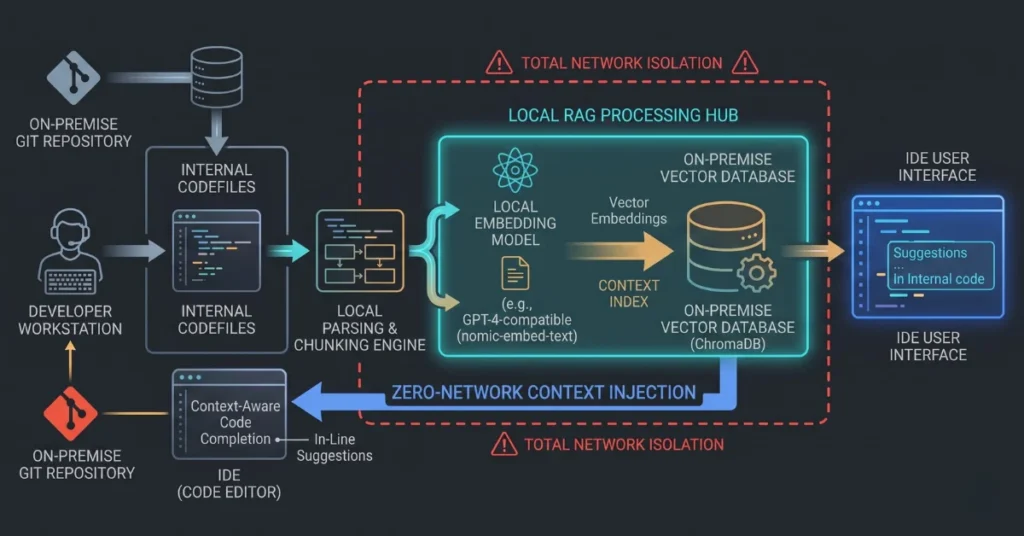
Use an embedded local database like ChromaDB or LanceDB running locally alongside an efficient embedding model like nomic-embed-text. When a developer asks for an internal API implementation, the stack retrieves the relevant internal files from the local index before generating the solution.
[ Internal Git Repository ] ──> [ Local Embedding Model ] ──> [ Embedded Vector Store ] ──> [ In-Context IDE Completion ]
Benchmarking Local Inference: Latency, Throughput, and Quality
Deploying a local AI development stack requires ongoing verification to ensure local models meet engineering productivity thresholds. Measuring performance involves three distinct metrics.
1. Time to First Token
Time to First Token measures the delay between sending a prompt and receiving the first generated character. For inline code autocompletion, TTFT must remain below 100 milliseconds to avoid breaking developer typing flow. Running localized models over high-speed system memory busses routinely achieves TTFT figures under 40 milliseconds.
2. Output Token Throughput
Throughput measures the generation speed in tokens per second. While human reading speed is roughly 5 to 8 tokens per second, code generation tasks like writing unit test suites or drafting boilerplate classes require throughputs above 25 tokens per second to maintain engineering momentum.
3. Context Retention and Window Degradation
A local LLM inference runtime must manage the Key-Value cache efficiently as conversation history expands. When configuring context windows beyond 16,000 tokens, ensure that flash attention optimizations are enabled in the backend runtime to prevent memory fragmentation and throughput collapse.
Operational Roadmap for Engineering Team Rollout
Transitioning an entire engineering department to a self-hosted local AI development stack requires a phased migration to ensure tooling consistency and developer buy-in.
Phase 1: Hardware Inventory and Model Selection (Week 1)
Audit team hardware capabilities across development machines. Identify available VRAM and system memory on every laptop and workstation. Determine the trade-offs between Ollama vs vLLM for developers based on whether your engineers work standalone or through a shared office server. Establish a standard baseline model family like Qwen 2.5 Coder or Llama 3 Code so that all engineers receive consistent code suggestions.
Phase 2: Local Daemon Deployment and Automation (Week 2)
Package the inference runtime, base model configurations, and IDE extensions into internal setup scripts. Automate the setup process so new developers can initialize the entire local AI environment with a single shell script during machine onboarding.
Phase 3: Internal Repository Indexing (Week 3)
Deploy the local vector storage pipeline across team projects. Generate vector embeddings for internal documentation, component libraries, and coding style guides. Test retrieval accuracy to ensure code generation matches internal naming conventions and architectural patterns.
Phase 4: Full Deployment and Network Isolation (Week 4+)
Route all routine code assistance, documentation parsing, and commit message formatting through the local stack. Apply firewall rules to block outbound developer IDE traffic to external commercial AI platforms, securing engineering team code privacy while saving recurring SaaS licensing expenses.
Final Operational Takeaways
Building a robust local AI development stack gives engineering organizations total sovereignty over their software development lifecycle. Moving away from third-party commercial cloud APIs protects proprietary source code, eliminates unpredictable operational billing, and provides developers with ultra-low latency coding assistance.
Before rolling out local inference infrastructure across your organization:
- Audit your physical hardware landscape to establish realistic model parameter targets based on available VRAM and unified memory.
- Standardize on a clear quantized model deployment strategy to run capable models on everyday development laptops without memory crashes.
- Choose the right backend tool by weighing Ollama vs vLLM for developers depending on your team hardware architecture.
- Enforce strict engineering team code privacy by ensuring every layer of your indexing and inference stack operates entirely inside your local network.
When engineering teams own their inference stack, they eliminate external dependencies and create a fast, secure, and cost-effective development environment built for long-term technical scale.