


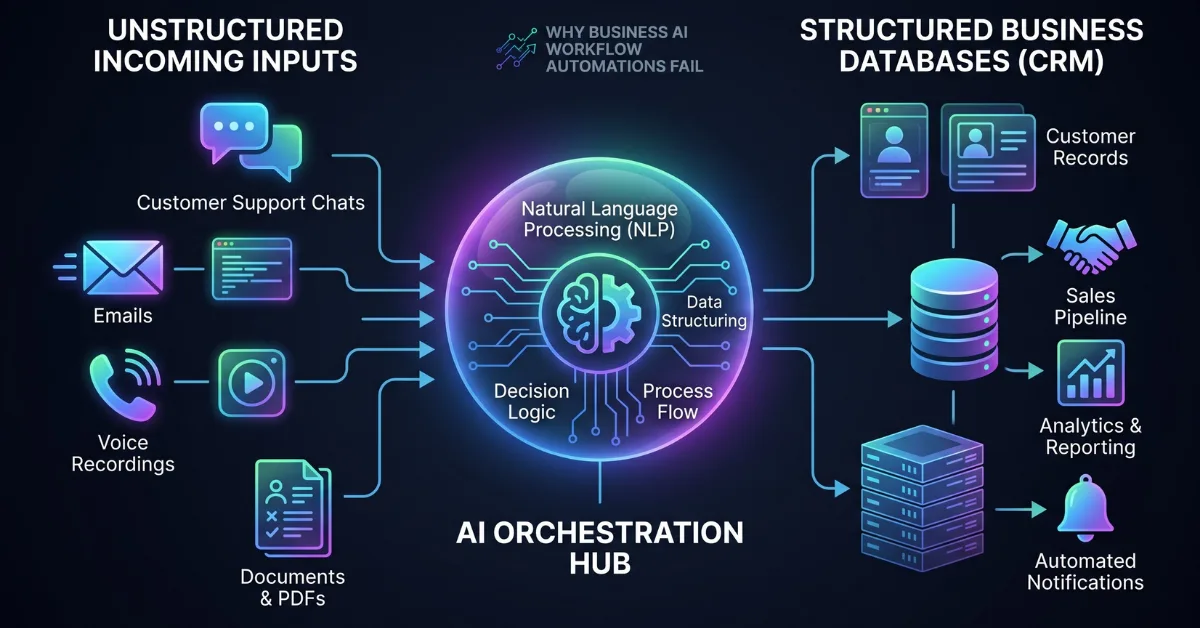
Modern companies rarely fail at digital transformation due to a lack of software options. In 2026, capable software solutions, integration platforms, and sophisticated large language models saturate the marketplace. The definitive problem is not access to technology. The problem is the fundamental approach to architecture. Businesses attempt to execute enterprise business AI workflow automation by simply purchasing disconnected software subscriptions and linking them together without an overarching data strategy.
Adding a sophisticated reasoning model to an unorganized process produces an automated broken process.
Deploying dependable business AI workflow automation that drives operational return requires a dedicated operational pipeline. This pipeline forces unstructured data to move cleanly between platforms. It ensures reasoning models parse context instantly. It also mandates human checkpoints to protect operational quality. A successful automation is a system of governance. It is not just a chain of API calls.
[ Raw Voice / Text Input ] ──> [ Central Parsing Engine ] ──> [ Human Approval Gate ] ──> [ Core Database ]
The Hidden Costs of Tool Overlap in Business AI Workflow Automation
The most significant threat to automated efficiency is the accumulation of point solutions. In 2026, many small-to-midmarket teams find themselves managing a chaotic stack of separate platforms. This tool overlap is rarely intentional. It happens incrementally as teams try to solve one isolated bottleneck at a time.
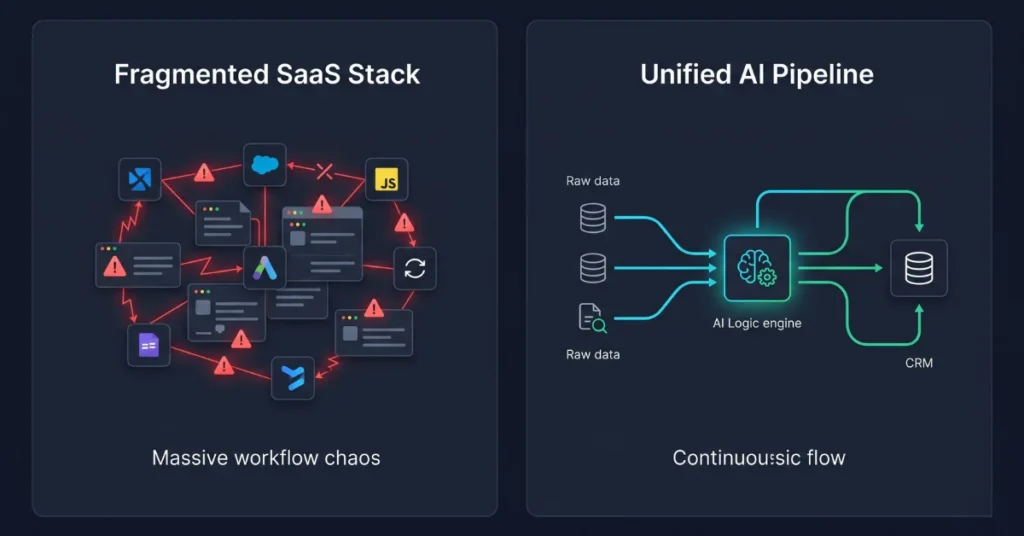
A typical inefficient stack might use multiple software subscriptions for related tasks. They might use one tool for meeting transcription, another for audio indexing, and a third platform to link them together. Separately, they might run a custom script to call an API. While each tool is functional, operating isolated business AI workflow automation subscriptions creates massive data silos. The lack of interoperability inflates monthly operational costs. It also introduces significant technical friction. It creates fragmented customer records.
When critical information lives in isolated applications, employees spend hours manually copying data from one dashboard to another. Manual copying defeats the entire purpose of the automation. A sustainable framework for business AI workflow automation rejects this fragmentation. A modern architecture uses a single central orchestration layer. This central hub is the only component configured to catch all raw inputs like emails, voice calls, or documents. It processes the underlying context using a singular logic core. It then dispatches structured tasks directly to your primary system of record.
Deep Dive: The Top 5 Failure Modes of Modern Automation
Understanding the primary failure modes of modern automation pipelines is essential for any engineering team attempting to build high-availability logic chains. These failures rarely stem from AI hallucinations. They are systemic infrastructure problems.
1. Brittle Integration Scripts and API Fragility
The reliance on visual builders to link APIs often results in extremely fragile logic pipelines. These visual builders function perfectly as long as incoming data is perfectly structured and API endpoints never change. However, when an incoming data format shifts slightly, like a customer email sent with messy formatting or an unexpected document attachment, standard webhooks collapse.
In technical terms, these scripts are missing essential validation and exception-handling layers. A business AI workflow automation failure occurs silently. The trigger fires. The model executes. But the payload never syncs to the database. The team remains unaware of the broken link until a critical deal falls through. When API dependencies and recurring cloud token costs threaten project reliability, many technical organizations choose to bypass third-party platforms entirely by deploying a dedicated local AI development stack on internal developer hardware.
2. Missing Human-in-the-Loop Reviews
The defining quality of a generative AI model is its reasoning and text generation capability. But even in 2026, models are capable of plausible fabrications or simple mistakes. Allowing an AI agent to trigger client-facing actions, like emailing a proposal or processing a refund, without a mandatory human sign-off is an unnecessary operational risk. An invisible human gate leads directly to communication errors, damaged customer relationships, and eroded trust in the automated system itself. Effective automation loop architecture must enforce a pause before any irreversible action is taken.
3. Task Consumption Spikes and Credit Runaway
Many platforms monetize automation by charging per task or API call. For example, a system might poll for new emails every 60 seconds. An AI automated pipeline failure occurs when a simple trigger loop, like on new email, call LLM, runs out of control. This usually happens when a process is not properly scoped with rate limits or exponential backoff.
If a flood of spam emails hits an inbox, a broad polling trigger will execute thousands of LLM calls simultaneously. This quickly burns through your monthly task credit allocation within minutes. It shuts down the entire automation stack.
4. Dirty Source Data
AI models are logic engines. Their output quality is determined entirely by the input data quality. If your primary CRM contains duplicate records, incomplete data, or outdated contact fields, the business AI workflow automation chain is doomed before it starts. The model will make perfect logical deductions based on inaccurate facts. The result is garbage structured output. You are not just spreading corrupt data faster. You are hard-coding bad data into your systems of record.
5. Lack of Process Standardization
You cannot automate what you do not understand. Organizations that attempt to deploy complex automation loops before establishing a predictable, manual procedure are doomed. Without a standard process where Step A must always occur before Step B, developers spend endless hours trying to program logic exceptions rather than core business rules. A reliable automated pipeline requires predictable, reliable inputs. To standardize tool interfaces and control data access across internal systems, engineering teams implement a dedicated Model Context Protocol server setup to enforce deterministic query guardrails.
Technical Comparison of Modern Automation Frameworks
Selecting the correct orchestration software depends entirely on your team technical capabilities and underlying data formats. The decision is no longer just custom code versus simple zaps. The technical architecture itself is the choice.
The comparison matrix below details the operational trade-offs across major architecture categories for business AI workflow automation.
| Architecture Type | Primary Function | Data Input Handling | Technical Complexity | Operational Risk |
| Autonomous Logic Agents | Processes unstructured text and executes decisions across app APIs | Natural language prompts, raw emails, audio transcripts | Medium | Unexpected API task consumption if prompts lack soft boundaries |
| Visual Scenario Builders | Executes multi-branch logic scenarios with conditional routing filters | JSON webhooks, database updates, HTTP calls | High | Requires ongoing developer maintenance for custom data parsing |
| Dynamic Calendar Engines | Reorganizes focus blocks based on task deadlines and meeting shifts | Task durations, hard deadlines, availability rules | Low | Algorithm collapses if users under-estimate task execution times |
| Voice Processing Networks | Extracts transcripts, action items, and CRM updates from live audio | Real-time audio streams, recorded video calls | Low | False-positive data updates written into custom CRM fields |
Step-by-Step Implementation: Deploying a Zero-Touch Lead Processing Engine
To illustrate exactly how a reliable business AI workflow automation loop functions in production, consider this end-to-end technical framework for processing incoming sales inquiries. This four-step architecture eliminates most manual data entry while ensuring total data integrity.
Step 1. Capture Raw Unstructured Data (The Trigger)
A modern lead capture workflow does not rely on rigid, fifteen-field web forms that kill conversion rates. The goal is to maximize information velocity by meeting clients where they are. In 2026, inputs are unstructured. Configure a generic webhook listener attached directly to your primary email inbox, form submitters, or call recording tools. Do not attempt to pre-parse this data. The entire raw payload, like a multi-part email body, raw voice note, or a PDF attachment, is the input.
Step 2. Parse Intent via Reasoning Models (The Processing Core)
This is the most critical phase: unstructured data parsing. The core orchestration hub must immediately route the raw text input from Step 1 into a central reasoning engine. This is not just a generic text prompt call. This is a scoped, deterministic query. Configure explicit rules to evaluate intent using structured prompt parameters. This ensures clean, standardized JSON output generation.
System Prompt Configuration:
"You are a Sales Engineering Data Steward. You analyze incoming unstructured customer messages.
Input: [Insert Raw Email or Audio Transcript]
Your Task: Extract and structure the following data points into a clean JSON object.
Fields to extract:
1. Estimated project budget ($ value only, omit symbols)
2. Primary service requested
3. Target delivery timeline (mapped to standardized calendar dates)
If the budget exceeds $5,000, set the Boolean field 'Priority_High' to TRUE.
You must output clean JSON only. Do not add conversational text. If a field cannot be found, output null."
By forcing the model to only output structured JSON with no fluff, you create a reliable payload. Subsequent automation steps can actually use this payload without crashing.
Step 3. Enforce Human-in-the-Loop Approval Gates (The Trust Layer)
This is where 90 percent of failed business AI workflow automation deployments diverge from successful ones. Do not automatically update the CRM. Instead, before any permanent database write is triggered, route the action to a human oversight channel. Use a communication platform like Slack or Microsoft Teams to present the parsed JSON payload. Add simple approve or reject buttons. A team member can verify the AI-generated logic in one click. This instantly catches any simple mistakes or budget errors.
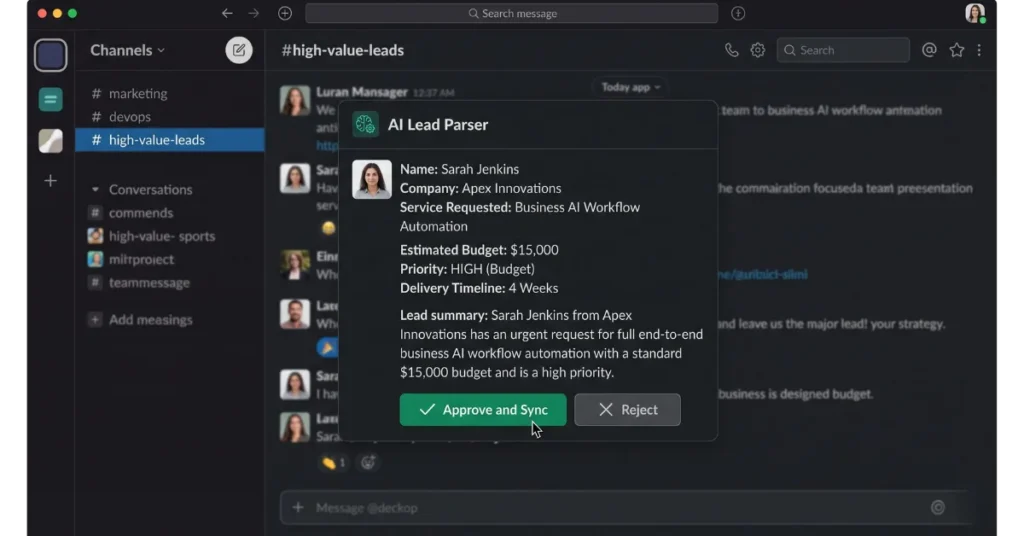
If the prompt in Step 2 set the high priority flag to true, use this data point to dynamically change the visual alert. For example, use a bright red alert card or send an automated message to the Sales Director. The human agent can manually adjust the budget from the staging interface before hitting final approval.
Step 4. Dispatch Clean Structured Payload (The System Sync)
Once approved by a human operator, the workflow proceeds. The system automatically updates the unique deal record in the CRM. It logs the raw project specifications in your documentation database. It cross-references the team availability calendar and automatically blocks out execution windows for the necessary staff based on the approved timeline.
Operational Roadmap for Internal Implementation
Deploying production-grade business AI workflow automation without disrupting ongoing business operations requires a structured, multi-week phase approach. Attempting a full-cutover in a single weekend is an operational death sentence. Follow this conservative roadmap to guarantee stability.
Phase 1: Audit and Manual Bottleneck Analysis (Week 1)
You must quantify the manual burden before automating it. Conduct a company-wide operational audit. Ask team leads to identify repetitive tasks that consume more than five hours per week of manual data entry, manual email shuffling, or spreadsheet updates. Document these processes manually in a central repository. This documentation becomes the functional spec for your automation code.
Phase 2: Build the Core Central Pipeline (Week 2)
Focus entirely on Step 1 and Step 4 of the Implementation Guide. Create the technical endpoints and establish clean authentication with your main systems of record, like your CRM, database, and calendar, in Step 4. At this stage, do not use any AI. Test the pipe using perfectly structured JSON. Ensure that data is writing correctly between the two applications.
Phase 3: Add Validation and Logic Gates (Week 3)
Build out the core processing core using an LLM call. Add the human review interface using a chat app or a staging dashboard. Test this entirely on historical business data. For example, process past lead emails through your prompt and verify the parsed JSON output for accuracy. Do not go live. Refine your system prompt context and operational parameters until you achieve ninety five percent parsing consistency. Verify that rate limits and rate limiting are functional.
Phase 4: Deploy, Monitor, and Phase-Out (Week 4+)
Launch the automation live but with human in the loop active for all actions. This is your stabilization period. For the first two to four weeks, every automated outcome requires manual verification. Track operational metrics: time saved per task, LLM token credit consumption, and the rate of manual exceptions. As trust in the system logic increases, you can selectively deactivate the human in the loop gate for low-risk actions. You must retain mandatory validation for financial deals or outbound client emails.
Final Operational Takeaways
Scaling a dependable business AI workflow automation stack is not about chasing the newest model or adopting every visual automation platform. It is about creating a stable, predictable system where technology handles the high-volume repetitive administrative tasks while human operators retain control over critical strategy, judgment calls, and data validation.
Before introducing a single new software subscription or writing a line of logic code:
- Map your entire process manually. Start from the initial customer touchpoint and go to the final database record. If you cannot do it manually, you cannot automate it.
- Define the exact data points that require unstructured data parsing. What fields must go from messy email text to clean, typed database columns?
- Establish non-negotiable human checkpoints for any high-risk action, such as outbound email triggers, financial updates, or processing a refund.
Building scalable automation requires data discipline and architectural maturity. When you eliminate disconnected tool overlap, consolidate your workflow logic around a central orchestration core, and protect your data quality with essential validation gates, your team reclaims dozens of lost hours every week to focus on actual business growth. This is the only path to positive automation ROI.