


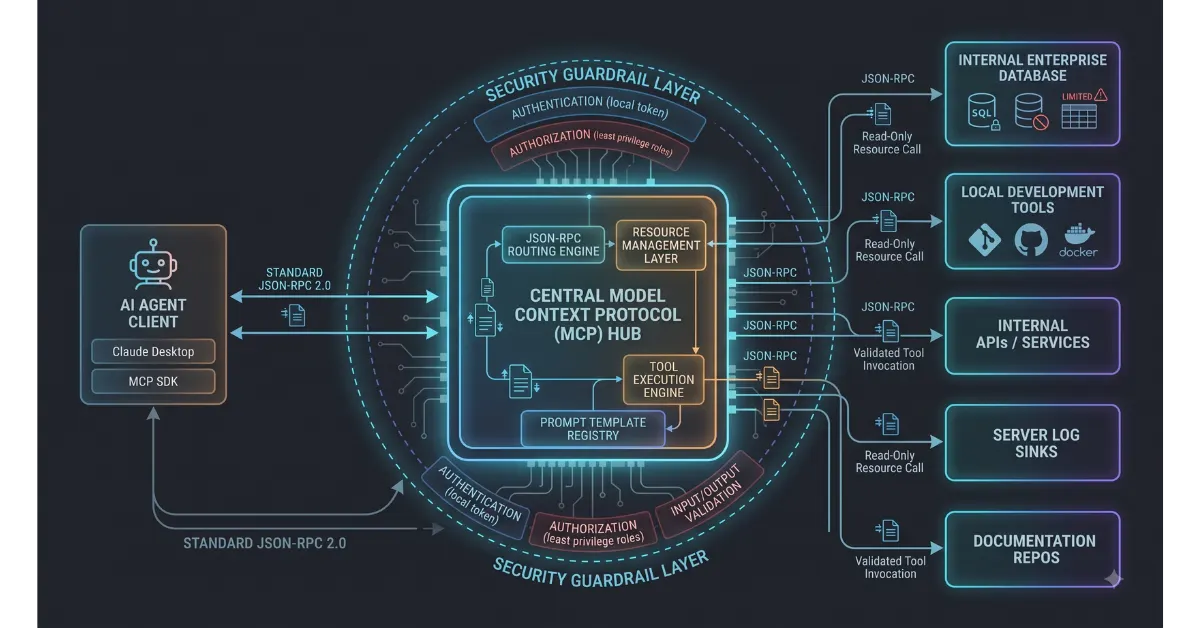
Enterprise engineering teams building automated pipelines often struggle with fragmented integration layers. Connecting Large Language Models to internal databases, development environments, and internal business tools historically required proprietary wrapper code, fragile REST endpoints, and unstandardized authentication layers. Deploying a dedicated Model Context Protocol server setup eliminates custom point-to-point glue code by implementing Anthropic open standard for secure, universal tool and context communication.
A standardized Model Context Protocol server setup provides three structural advantages for enterprise pipelines. First, it replaces bespoke custom API connectors with a single open client-server protocol. Second, it enforces strict local data governance by routing database queries through controlled local interfaces. Third, it allows intelligent agents to discover, inspect, and run internal developer tools dynamically without manual code changes.
[ LLM Client / Agent ] <──( Standardized JSON-RPC / MCP )──> [ Local MCP Server ] <──> [ Enterprise Database / Internal APIs ]
Why Enterprise Teams Are Standardizing on MCP Architecture
Traditional business automation relied on static functions and hardcoded webhook endpoints. When an engineering team wanted an AI assistant to query production metrics or trigger a Git workflow, developers wrote customized execution wrappers. This created massive maintenance overhead whenever an upstream endpoint modified its request schema.
Modern MCP architecture for enterprise decouples model reasoning from internal data access layers. Instead of hardcoding API specifications into LLM system prompts, the model communicates with an on-premise MCP server using standardized JSON-RPC messages. The server acts as a secure proxy, exposing standardized resources, dynamic prompts, and executable tools to the model.
Adopting an open protocol standard also safeguards secure LLM tool integration across multi-agent environments. Engineering organizations can grant models granular access to internal systems while keeping authentication credentials, API keys, and database connection strings completely isolated within the local server environment.
Core Advantages of Protocol-Driven Tooling
- Standardized Interface Schemas: Tools and resources follow a single universal contract, eliminating custom connector code.
- Isolated Credential Management: The model receives only tool declarations, keeping internal API secrets and database passwords securely hidden inside the server runtime.
- Dynamic Context Discovery: AI agents query the MCP server at runtime to inspect available tools, schemas, and live database tables dynamically.
- Universal Model Interoperability: Any MCP-compliant client or IDE extension can immediately access enterprise tools without modifying the underlying infrastructure.
Architectural Anatomy of an Enterprise MCP Server
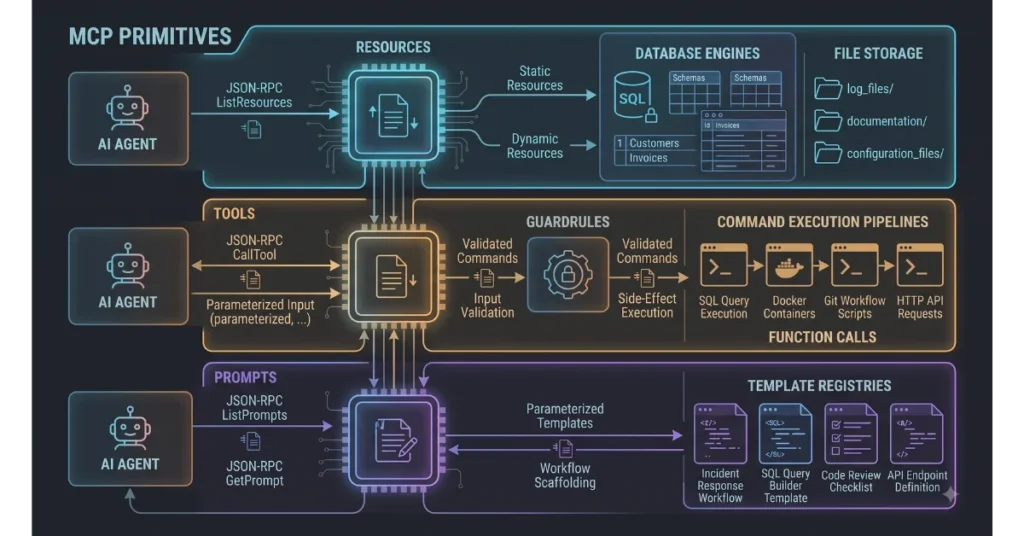
A production-grade Model Context Protocol server setup consists of three distinct primitives that expose internal capabilities to language models.
| MCP Primitive | Architectural Role | Enterprise Use Case Example | Model Access Type |
| Resources | Static or dynamic file-like data payloads | Exposing server log files, documentation repos, and git commit histories | Read-only context injection |
| Tools | Executable functions callable by the model | Running SQL database queries, restarting docker containers, updating tickets | Read-write operational execution |
| Prompts | Pre-parameterized workflow templates | Standardized incident response workflows, code review templates | Interactive execution scaffolding |
When architecting MCP architecture for enterprise, engineering teams typically implement servers either via Standard Input and Output (stdio) for local workstation tools or Server-Sent Events (SSE) for distributed team microservices.
Technical Comparison: Custom Function Calling vs MCP Architecture
| Evaluation Vector | Bespoke Custom Function Calling | Standardized Enterprise MCP Server |
| Protocol Uniformity | Non-standardized, varies by model provider | Universal JSON-RPC 2.0 specification |
| Tool Portability | Locked to specific proprietary vendor APIs | Portable across any MCP-compliant model or IDE |
| Security Perimeter | Requires passing API tokens through prompt pipelines | Server manages credentials locally behind strict permission walls |
| Context Refreshing | Manual prompt engineering on every request | Automated resource subscriptions with real-time push updates |
| Infrastructure Scalability | High technical debt with fragile glue code | Modular microservice architecture with plug-and-play tools |
Step-by-Step Implementation: Building a Production MCP Database Server
Follow this technical implementation guide to deploy a secure Model Context Protocol server setup using TypeScript and Node.js. This server exposes a PostgreSQL database to local LLMs with parameterized tool guardrails.
Step 1. Initialize the TypeScript Project
Set up a clean project workspace and install the official Model Context Protocol Software Development Kit alongside database drivers.
mkdir enterprise-mcp-server
cd enterprise-mcp-server
npm init -y
npm install @modelcontextprotocol/sdk pg dotenv
npm install --save-dev typescript @types/node @types/pg ts-node
npx tsc --init
Step 2. Build the Core Server Engine
Create the primary server entry point. This file configures the server instance, declares system capabilities, and establishes secure LLM tool integration by defining strict parameter validation rules.
import { Server } from "@modelcontextprotocol/sdk/server/index.js";
import { StdioServerTransport } from "@modelcontextprotocol/sdk/server/stdio.js";
import {
  CallToolRequestSchema,
  ListToolsRequestSchema,
} from "@modelcontextprotocol/sdk/types.js";
import { Pool } from "pg";
import dotenv from "dotenv";

dotenv.config();

const dbPool = new Pool({
  connectionString: process.env.DATABASE_URL,
});

const server = new Server(
  {
    name: "enterprise-postgres-mcp",
    version: "1.0.0",
  },
  {
    capabilities: {
      tools: {},
    },
  }
);

// Register available database query tools
server.setRequestHandler(ListToolsRequestSchema, async () => {
  return {
    tools: [
      {
        name: "execute_readonly_query",
        description: "Executes a validated read-only SQL query against the enterprise customer database.",
        inputSchema: {
          type: "object",
          properties: {
            sqlQuery: {
              type: "string",
              description: "The SELECT SQL query to run.",
            },
          },
          required: ["sqlQuery"],
        },
      },
    ],
  };
});
Step 3. Implement Guardrails for Secure LLM Tool Integration
Language models should never execute unvalidated raw SQL. Enforce strict parameter parsing and command whitelisting to block destructive write operations.
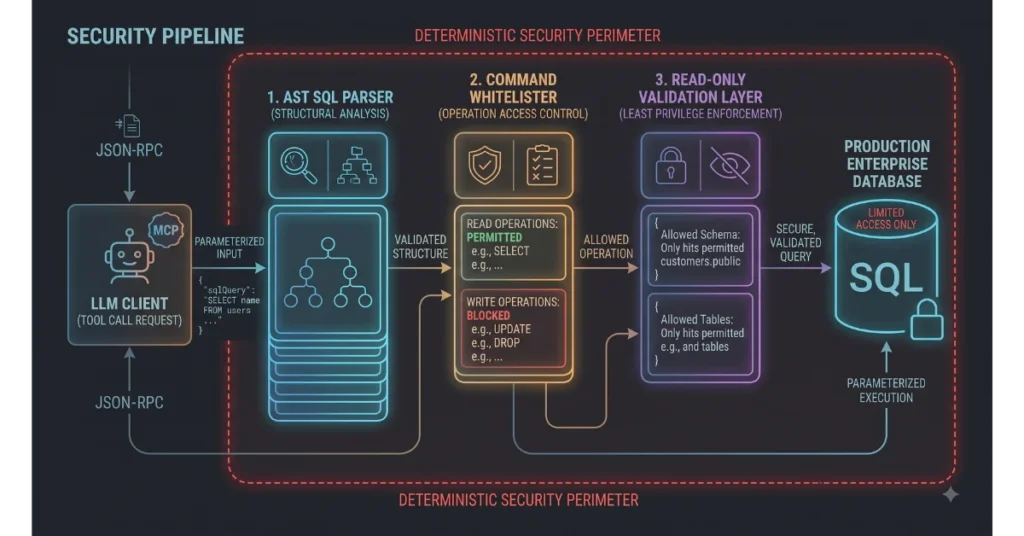
server.setRequestHandler(CallToolRequestSchema, async (request) => {
  if (request.params.name === "execute_readonly_query") {
    const rawSql = String(request.params.arguments?.sqlQuery).trim();

    // Guardrail: Block non-read operations
    if (!rawSql.toUpperCase().startsWith("SELECT")) {
      throw new Error("Security Violation: Only SELECT statements are permitted.");
    }

    try {
      const client = await dbPool.connect();
      const result = await client.query(rawSql);
      client.release();

      return {
        content: [
          {
            type: "text",
            text: JSON.stringify(result.rows, null, 2),
          },
        ],
      };
    } catch (error) {
      return {
        isError: true,
        content: [
          {
            type: "text",
            text: `Database Error: ${(error as Error).message}`,
          },
        ],
      };
    }
  }

  throw new Error("Tool not found.");
});

async function run() {
  const transport = new StdioServerTransport();
  await server.connect(transport);
}

run().catch(console.error);
Step 4. Connecting Claude to Local Databases
Configure the developer client to connect to your newly deployed server. For desktop environments, add the server configuration directly to the local application configuration file.
Update the central application settings file to establish the connection:
{
  "mcpServers": {
    "enterprise-database": {
      "command": "node",
      "args": ["/absolute/path/to/enterprise-mcp-server/dist/index.js"],
      "env": {
        "DATABASE_URL": "postgresql://app_user:secret_pass@localhost:5432/production_db"
      }
    }
  }
}
This configuration completes the process of connecting Claude to local databases, enabling the model to inspect customer tables and pull telemetry data without exposing credentials to third-party endpoints.
Enterprise MCP Deployment Best Practices
Deploying protocol servers in production environments requires strict operational controls to prevent data exposure and resource exhaustion.
1. Enforce Principle of Least Privilege Database Roles
Never connect an MCP server to an enterprise database using root or administrator database credentials. Provision dedicated database users with restricted SELECT privileges limited strictly to the schemas and tables required for the specific operational workflow.
2. Implement Read-Only Workflows by Default
Separate read tools from write tools across different server modules. Read-only queries should execute without user friction, while actions that modify state (such as updating order tables or executing deployments) must require human confirmation before execution.
3. Containerize Server Instances
Package team MCP servers inside lightweight Docker containers. Containerization ensures consistent runtime dependencies across developer workstations and isolates local filesystem access from the host machine.
4. Monitor Token Context Budgets
Large database query results can quickly exhaust an LLM prompt context window. Always enforce pagination limits inside your tool implementation, returning a maximum of twenty to fifty rows per query to prevent runaway token consumption and degraded response latency.
Operational Roadmap for Rolling Out Enterprise MCP
Integrating protocol servers across an enterprise organization requires a systematic rollout to ensure security compliance and developer adoption.
Phase 1: Tool Audit and Schema Mapping (Week 1)
Identify the internal tools, log sinks, and databases developers access most frequently. Map existing internal REST API schemas to standardized MCP tool definitions. Establish strict data boundaries to determine which fields should remain private.
Phase 2: Server Prototyping and Local Testing (Week 2)
Build localized TypeScript or Python MCP servers for core services. Test tool execution locally using stdio transports. Verify that input schemas include clear descriptions so models select the correct tools reliably during multi-step reasoning tasks.
Phase 3: Centralized Packaging and Access Controls (Week 3)
Package MCP servers into private npm packages or container images. Distribute standard configuration files to engineering team machines. Verify that sensitive environment variables and connection strings are managed through company password managers or local environment files.
Phase 4: Production Telemetry and Monitoring (Week 4+)
Monitor server performance, tool error rates, and query latency across development teams. Implement server-side logging to audit every tool invocation, ensuring complete transparency into how models interact with internal enterprise assets.
Interlinking Enterprise Protocols with Core Workflow Infrastructure
Deploying a dedicated Model Context Protocol server setup solves the last-mile connectivity challenge in modern automation. While scaling complex cloud platforms often triggers fragile pipelines and operational breakdowns in business AI workflow automation, standardizing on protocol-driven server layers delivers deterministic, auditable execution.
Furthermore, engineering teams running an on-premise local AI development stack can pair local quantized models with private MCP servers, building a completely air-gapped development environment that operates without cloud dependencies.