


Testing your web code shouldn’t require opening a heavy desktop IDE or installing extensions. This live html test platform gives you an instant, zero-setup playground to write, run, and preview your frontend elements side by side. Designed for speed and compatibility, it serves as a lightweight html code runner directly inside your web browser. Test HTML code online NOW!
How to use the HTML code tester?
Input or Upload Code
Type your markup manually, paste code snippets, or use the "Upload File" feature to instantly import your local HTML or TXT documents right into the workspace terminal.
Analyze Live Results
Watch your modifications render instantly in the side-by-side preview window frame without needing a manual browser page refresh or local server configuration.
Debug & Export Layout
Spot code mistakes immediately with the real-time dashed red underline checks, optimize with the minifier, and download your finalized error-free code file with a single click.
Advanced Features Built Into Our HTML Tester
Direct File Upload
Skip manual copy-pasting entirely. Use the built-in file extractor to upload local .html, .htm, or .txt documents directly into the editor terminal workspace instantly.
Real-Time Syntax Debugging
Our native background parsing engine runs a live analysis on your structural balance, placing high-visibility red dashed underlines beneath broken markup or dangling open tags.
Instant Tailwind CSS Integration
Toggle modern utility-first CSS styling classes dynamically. Turning on the control switch injections handles the backend script integration seamlessly without extra configurations.
Format & Minify Optimization
Beautifully structure messy syntax blocks using the indentation formatting tool for easy reading, or apply deep data compression to single-line production layouts.
History State Tracking
Never worry about losing edits. The control panel row includes responsive undo and redo command hooks to navigate back and forth through your terminal workspace history.
Download & Share Sandboxes
Save compiled frontends as an index.html file with a single click, or generate character-safe URL parameters to share live work modules with team members instantly.
Free HTML Code Tester for Speed and Efficiency
Whether you are writing clean landing page layouts, fine-tuning an email template, or testing custom responsive styles, using an interactive html code tester ensures your structure renders properly before going live. This test html code online web tool works entirely inside your browser, acting as an instant sandbox to isolate your elements and check layout errors on the spot.
Traditional web design often requires saving local files, setting up a local server, and continuously refreshing Chrome to see simple layout adjustments. This web terminal eliminates that extra steps by combining an advanced coding workspace with an instantaneous render panel.
How the Tool Simplifies Frontend Design
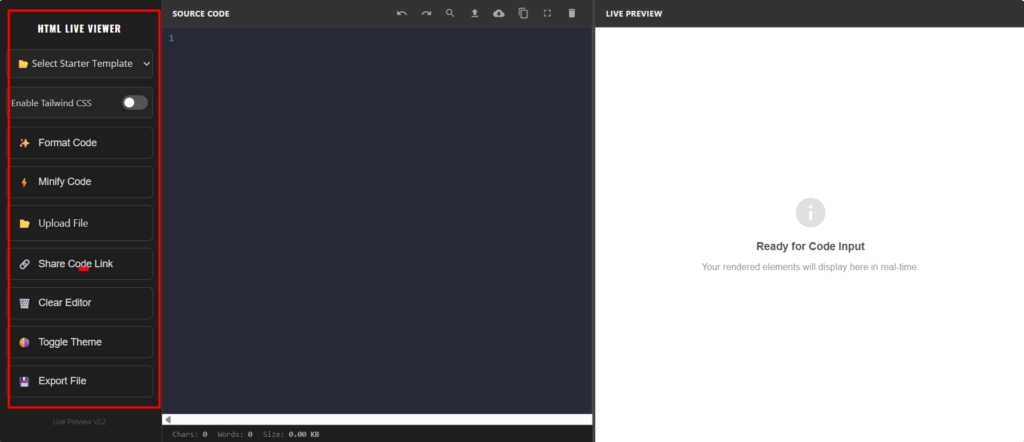
Every feature built into this terminal panel is customized to speed up your routine layout testing. Here is a breakdown of how to use each utility effectively:
- Pre-built Design Layout Templates: Located at the top of the control pane, the starter dropdown menu lets you quickly load pre-coded UI assets like premium pricing tables, responsive login cards, and clean profile components. This saves you from typing basic setup tags from scratch.
- One-Click Tailwind CSS Integration: Turning on the Tailwind toggle instantly loads the modern utility utility engine script directly into the frame backend. This allows you to write utility-first styling classes right inside the workspace without manually importing CDN scripts.
- Smart Code Formatting & Compression: Badly structured spacing makes debugging an issue difficult. Use the Format Code utility to clean and beautifully indent messy structural lines. Conversely, if you are looking to deploy production-ready layouts, use the Minify Code switch to compress your files into a single optimized line to save weight.
- Integrated Local File Uploader & Exporter: You do not need to copy and paste code manually. Use the file input button to load raw text files or custom structural documents directly into the editor pane. Once your editing process is complete, hit the export command to save your production layout as a ready-to-use local file.
- Safe Sandbox Shareable Links: If you are looking to collaborate with team members or clients, clicking the share utility creates a character-safe url containing your exact work parameters. Copy and share the URL so others can view your live project instantly. Test HTML code online now.
Why Use This Live HTML Tester Over a Basic Text Editor?
When you are testing html code in a browser, simple text editors like Notepad often fall short. They lack auto-closing tags, bracket matching, and real-time render tracking, leading to broken layouts and lost time.
This environment functions as an intelligent html code checker and fixer block, built to make code creation straightforward and fluid:
- Instant Visual Output: There is no delay. As you type, change properties, or alter text, the changes display instantly, helping you spot unclosed containers and layout breaks before they break your live theme layout files.
- Intelligent Typing Assistance: Built-in auto-completion inserts closing tags and elements as you type. This prevents typical syntax syntax mistakes, especially when writing code on smaller laptop screens or mobile devices.
- Comprehensive Workspace Metrics: Keep a strict track of your project size with the real-time footer analytics row. It automatically tracks your exact character counts, word density, and final file footprint weight in Kilobytes, ensuring your layout keeps lightweight and responsive. Test HTML code online now.
Frequently Asked Questions (FAQs)
More FREE Without Sign-Up Tools